Scalper EA for MT5
MetaTrader Expert Advisor
A simple and fast scalping Expert Advisor for MetaTrader 5. This MT5 trading robot is designed for quick market entries and exits based on price action, offering a lightweight and easy-to-use automated trading system. The expert advisor bypasses complex configurations, making it accessible to retail traders while retaining the rapid processing power required by professional intraday scalpers. Despite its minimalist and lightweight design, the trading robot includes essential risk protection features to insulate capital from sudden adverse spikes. Users can establish hard stop-losses, configure rapid take-profit thresholds, and set time-of-day filters to restrict automated trading during high-risk news events or low-liquidity sessions. This balance of rapid-fire execution logic and straightforward risk management provides a disciplined, mechanical approach to scalping without the burden of constant manual chart monitoring.
Alternative download link Added to cart — redirecting to checkout in 3 seconds...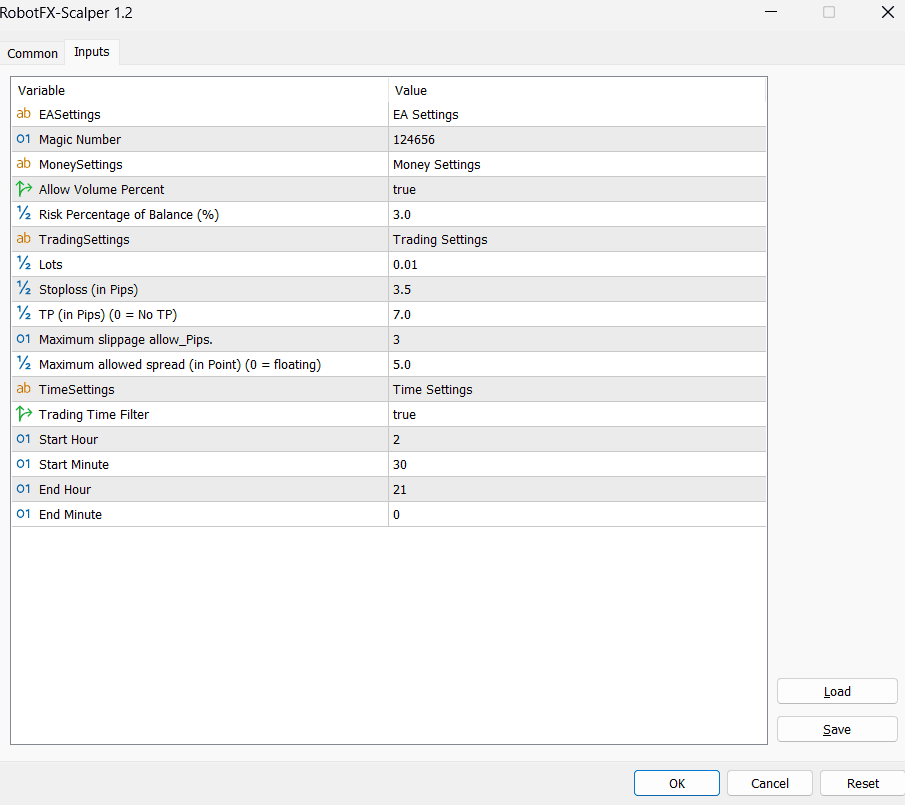
Configuring Scalper EA Settings
Use the time filter to optimize trading during high-volatility sessions such as London and New York for better scalping performance.
Scalper EA MT5 FAQ
What is the Scalper Expert Advisor MT5?
It is an automated
MetaTrader 5 trading robot
designed for fast scalping strategies based on short-term price movement.
Does the Scalper EA work on all symbols?
Yes, it can be used on forex, indices, and other CFD markets depending on broker
conditions.
Is the Scalper EA fully automatic?
Yes, once attached to a chart it executes trades automatically based on its
internal logic and filters.
Can I use it on a demo account first?
Yes, and it is strongly recommended before using it on a live account.
How to use Scalper Expert Advisor MT5
Step 1: Download and install the EA into your MetaTrader 5 “Experts” folder.
Step 2: Attach the Scalper MT5 EA to your preferred trading chart.
Step 3: Enable automated trading in MetaTrader 5 settings.
Step 4: Configure lot size, risk settings, and time filters if needed.
Step 5: Let the scalping expert advisor analyze price action and execute trades automatically.
RobotFX Suggested Video
The video will explain how the RobotFX Auto Recovery works and the strategy behind the loss recovery. Feel free to watch the rest of the videos too.