MACD EA for MT4
MetaTrader Expert Advisor
The MACD Expert Advisor provides a sophisticated, automated approach to trend-following strategies on both MetaTrader 4 and MetaTrader 5 platforms. By integrating the power of the MACD indicator for reliable trend detection with the tactical precision of the Stochastic oscillator for refined entry timing, this tool effectively filters out false signals. This dual-indicator configuration ensures that trades are only executed when momentum and trend direction align, allowing for high-accuracy decision-making. Traders can leverage this system to maintain a disciplined approach to market volatility, ensuring that entries are optimized for maximum efficiency while adhering to a robust, rules-based methodology tailored for sustained performance.
Alternative download link Added to cart — redirecting to checkout in 3 seconds...
Key Features of the MACD EA for MT4
- MACD trend trading: Trades are triggered based on MACD crossover signals and trend direction relative to the zero line.
- Stochastic confirmation: Filters entries using overbought and oversold conditions to improve timing precision.
- Automatic trade management: Opens, closes, and reverses trades based on changing market momentum.
- Risk management system: Includes stop-loss, take-profit, trailing stop, break-even, and configurable lot sizing.
The MACD EA for MetaTrader is a fully automated trading system built around one of the most widely used momentum indicators in technical analysis: the Moving Average Convergence Divergence (MACD). It is designed for traders who want a structured trend-following approach without manual chart monitoring. By combining MACD trend direction with stochastic-based entry filtering, the EA reduces false signals and improves trade timing. Traders looking for additional momentum-based systems may also be interested in the Traders Dynamic Index Expert Advisor for MT4, which combines multiple market signals into a single trading strategy.
This expert advisor is especially effective in trending markets, where MACD crossovers reflect momentum shifts. It continuously monitors price action and executes trades in alignment with the dominant trend. For traders seeking alternative trend-following approaches, the Heiken Ashi Expert Advisor for MT4 and MT5 and Price Channel Expert Advisor for MT4 offer different methods for identifying and trading market trends automatically.
MACD EA Trend Trading Examples
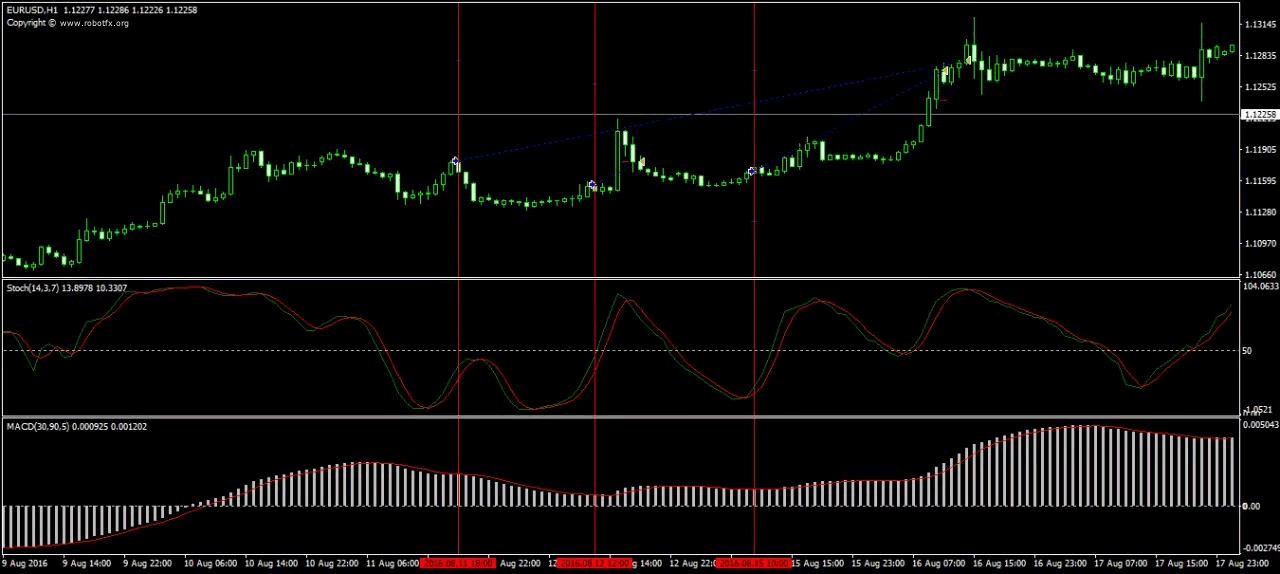
The MACD Expert Advisor identifies trend direction using MACD crossover logic and aligns all trades with momentum. When the MACD line crosses above the signal line, the EA prioritizes buy setups; when it crosses below, it prioritizes sell setups.
Entry precision is improved using the Stochastic oscillator, which helps avoid late entries during exhausted moves. This combination makes the strategy more stable across different market conditions, especially when paired with disciplined risk settings.
Configuring MACD EA Settings
- Client Email: Used for licensing paid versions on live accounts.
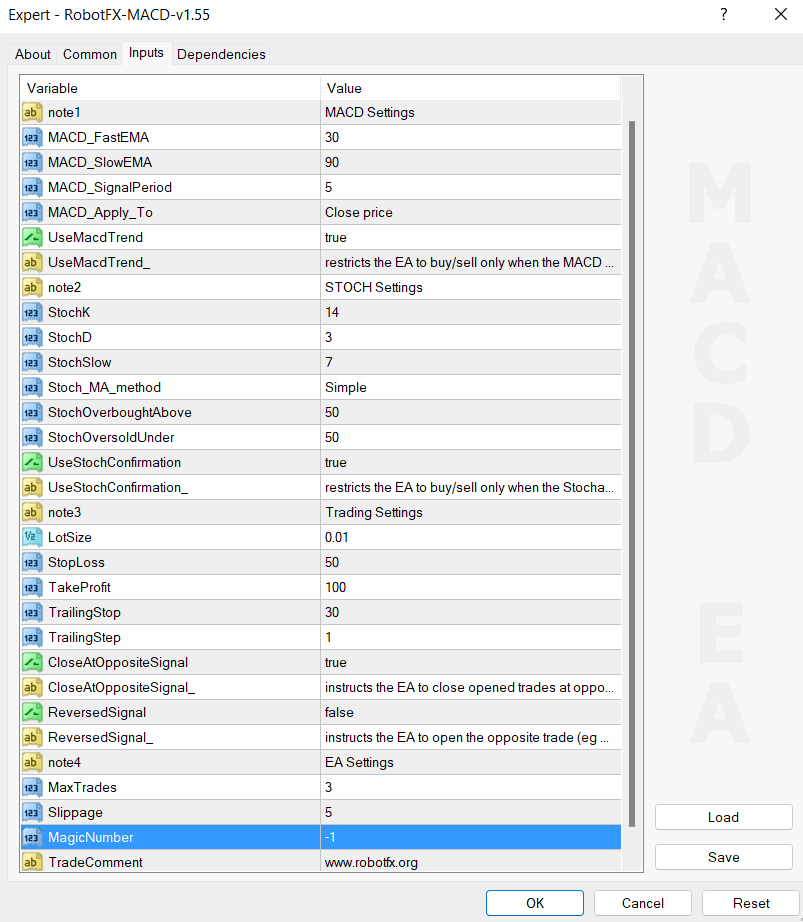
- MACD Settings: Defines fast, slow, and signal moving averages for trend detection.
- UseMACDTrend: Enables trend filtering based on MACD position relative to zero line.
- Stochastic Settings: Controls overbought/oversold entry confirmation levels.
- CloseAtOppositeSignal: Automatically closes trades when opposite signals appear.
- ReversedSignal: Inverts trading logic for counter-trend strategies.
- Risk Settings: Configure lot size, stop-loss, take-profit, trailing stop, and break-even.
- EA Settings: Includes max trades, slippage, and magic number management.
The same MACD configuration used for trend detection is also used for entry and exit logic, ensuring consistency across signals.
This MACD Expert Advisor is flexible enough to support both conservative and aggressive trading styles. Traders can fine-tune stochastic confirmation to reduce noise or disable it for faster execution. For alternative execution models, you may also explore the News OCO Expert Advisor for MT4, which uses breakout-based logic during high-impact market events.
How to Install MACD Expert Advisor on MT4
- Download the MACD Expert Advisor file and extract it from the ZIP archive.
- Open MetaTrader 4 and click File → Open Data Folder.
- Navigate to MQL4 → Experts and paste the EA file inside this folder.
- Restart MetaTrader 4 or refresh the Navigator panel.
- Open a chart of your preferred trading pair (EURUSD, GBPUSD, etc.).
- Drag and drop the MACD Expert Advisor onto the chart.
- Enable AutoTrading and adjust input settings if needed.
- Check the top-right corner of the chart to confirm the EA is active.
MACD Expert Advisor FAQ
What is the MACD Expert Advisor?
The MACD EA is an automated trading system that uses MACD crossovers and trend
direction to open and close trades automatically.
Does the MACD EA work on MT4 and MT5?
Yes, it is designed for both
MetaTrader 4 Expert Advisors
and
MetaTrader 5 Expert Advisors
platforms.
Does it use indicators besides MACD?
Yes, it can use the
Stochastic oscillator
for entry confirmation to reduce false signals.
Is the MACD EA suitable for beginners?
Yes, it is beginner-friendly because it automates both entry and exit logic
based on clear indicator rules.
Can I customize the trading strategy?
Yes, you can adjust MACD settings, stochastic filters, lot size, stop-loss,
take-profit, and risk controls.
Is this EA good for trending markets?
Yes, it performs best in trending conditions where MACD momentum signals are
strongest.
RobotFX MACD EA Video Tutorial
What you will learn in this video: you will see how the MACD Expert Advisor identifies market trends using MACD crossover signals and the zero-line filter, and how it applies these signals to automatically open and manage trades on MetaTrader. The video explains how Stochastic confirmation is used to refine entries by filtering overbought and oversold conditions, reducing false signals during sideways markets. You will also understand how the EA handles trade management in real time, including closing positions when opposite signals appear, applying stop-loss and take-profit levels, and optionally using trailing stop and break-even logic to protect profits. Finally, the walkthrough demonstrates how different settings affect strategy behavior, allowing you to adapt the EA for conservative or more aggressive trend-following trading styles. You will have to watch the rest of the videos too if you want to master this trading tool.