MACD EA for MT5
MetaTrader Expert Advisor
The MACD Expert Advisor for MetaTrader 5 leverages the analytical power of the Moving Average Convergence Divergence (MACD) indicator, pairing it with specialized moving average filters to build a comprehensive trend-following framework. By constantly reading real-time price action, the algorithm calculates the spatial relationship between the MACD line, the signal line, and the zero histogram. This layered analysis allows the automated system to pinpoint high-probability trade entries during market momentum shifts and establish structural trade exits.
Alternative download link Added to cart — redirecting to checkout in 3 seconds...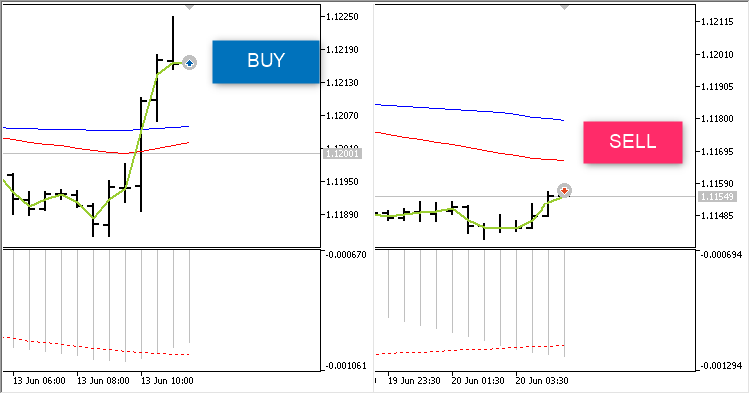
Key Features of the MACD EA for MT5
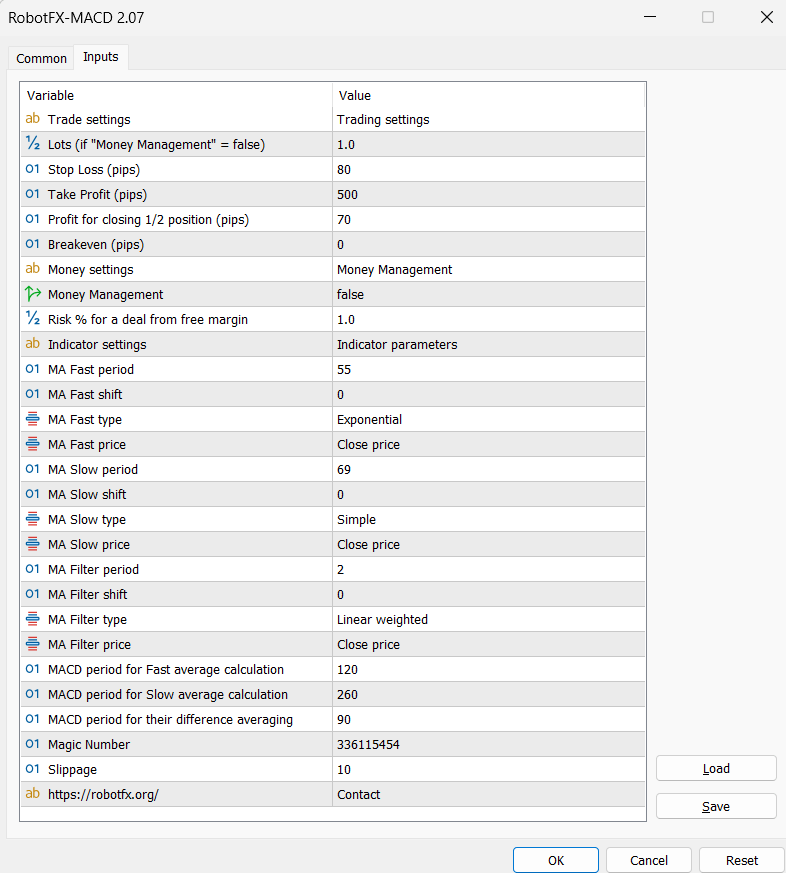
When a valid entry signal happens, the opposite position – if any – is closed. The EA can also close half of the position (see the Profit for closing 1/2 position parameter), as well as move the position to breakeven (Breakeven parameter). The size of the position can be set manually (Lots parameter) or as a risk percent of free margin (Risk % for a deal from free margin). For the risk percent as free margin to work, the Money Management must be set to true.
The MACD EA settings are easy to understand and self explanatory. Traders who also use volatility-based systems often compare this logic with the Bollinger Bands Expert Advisor MT5 or combine momentum filtering with tools like the RSI Martingale Expert Advisor MT5 for additional strategy confirmation.
Use the Magic Number to monitor trades opened by the expert advisor, or to allow other EAs to interfere with the MACD EA trades. Advanced traders who manage multiple systems often combine MACD-based logic with portfolio-style automation tools such as the MultiTrader Expert Advisor MT4.
How to Trade Forex Using the MACD Indicator on Metatrader 5
The MACD indicator, or Moving Average Convergence Divergence, is a popular tool for technical analysis in forex trading. It helps traders identify the direction and strength of the market trend, as well as potential entry and exit points. In this article, we explain how the MACD indicator works, how to set it up on Metatrader 5, and how to use it in a trading strategy.
What is the MACD Indicator?
The MACD indicator consists of three components: the MACD line, the signal line, and the histogram. The MACD line is calculated by subtracting a 26-period exponential moving average (EMA) from a 12-period EMA. The signal line is a 9-period EMA of the MACD line. The histogram shows the difference between the MACD line and the signal line.
The MACD indicator can be used to measure the momentum and direction of the market trend. When the MACD line crosses above the signal line, it indicates bullish momentum and a possible buy signal. When the MACD line crosses below the signal line, it indicates bearish momentum and a possible sell signal. The histogram can also show the strength of the trend. When the histogram is positive, it means the MACD line is above the signal line and the trend is up. When the histogram is negative, it means the MACD line is below the signal line and the trend is down. The larger the histogram, the stronger the trend.
How to Set Up the MACD Indicator on Metatrader 5
To add the MACD indicator to your Metatrader 5 chart, follow these steps:
- Open the chart of the currency pair you want to trade.
- Click on the Insert tab and select Indicators > Oscillators > MACD.
- A window will pop up where you can adjust the parameters of the indicator. The default settings are 12, 26, and 9 for the MACD line, the signal line, and the histogram, respectively. You can also change the colors and styles of the lines and the histogram. Click OK when you are done.
- The MACD indicator will appear below the price chart.
How to Use the MACD Indicator in Your Trading Strategy
There are several ways to use the MACD indicator in a trading strategy. Here are some of the most common ones:
- Crossovers: Use the crossovers of the MACD line and the signal line as entry and exit signals. For example, buy when the MACD line crosses above the signal line and sell when the MACD line crosses below the signal line. Traders using crossover systems may also compare logic with the NonLagMA Expert Advisor MT4/MT5 or Trend Dashboard Indicator MT5 for trend confirmation.
- Overbought and oversold conditions: When the MACD line and histogram move far away from the zero line, the market may be overextended and due for a reversal or correction. Similar momentum-based filtering is also used in the CCI Expert Advisor MT5 and Bollinger RSI Expert Advisor MT5.
- Divergences: A divergence occurs when the price makes a new high or low, but the MACD indicator fails to confirm it. This can indicate weakening momentum and a potential trend reversal.
The MACD indicator is a versatile and powerful tool for forex trading. However, it should be used together with other technical analysis tools such as support and resistance levels, trend lines, and candlestick patterns. Proper risk management and money management techniques are also essential. Traders who want additional automated execution logic often combine MACD strategies with systems like the Scalper Expert Advisor MT5 or Tech Trader Expert Advisor MT5.
Configuring MACD EA Settings
RobotFX Suggested Video
The video will explain how the RobotFX Auto Recovery works and the strategy behind the loss recovery. Feel free to watch the rest of the videos too.