Trend Dashboard MT5
MetaTrader Indicator
The Trend Dashboard Indicator MT5 is a sophisticated, multi-timeframe trend analysis panel designed to stream market direction simultaneously across nine distinct timeframes (M1 to MN1). By aggregating three powerful momentum filters—the Stochastic Oscillator, the Relative Strength Index (RSI), and the Commodity Channel Index (CCI)—into a single, unified on-screen visual grid, this MetaTrader 5 tool gives traders a comprehensive overview of global market strength without cluttering their execution charts. The underlying software algorithm continuously calculates and updates technical data in the background, translating complex mathematical percentages from each individual timeframe into an easy-to-read, color-coded matrix. By tracking where short-term momentum aligns with long-term macroeconomic trends, the panel highlights high-probability confluence zones—the exact moments when multiple timeframes point in the same direction. This multi-layered filtering process helps intraday traders and swing traders alike filter out localized market noise, prevent premature entries against dominant flows, and make disciplined, data-driven decisions directly from a clean workspace.
Alternative download link Added to cart — redirecting to checkout in 3 seconds...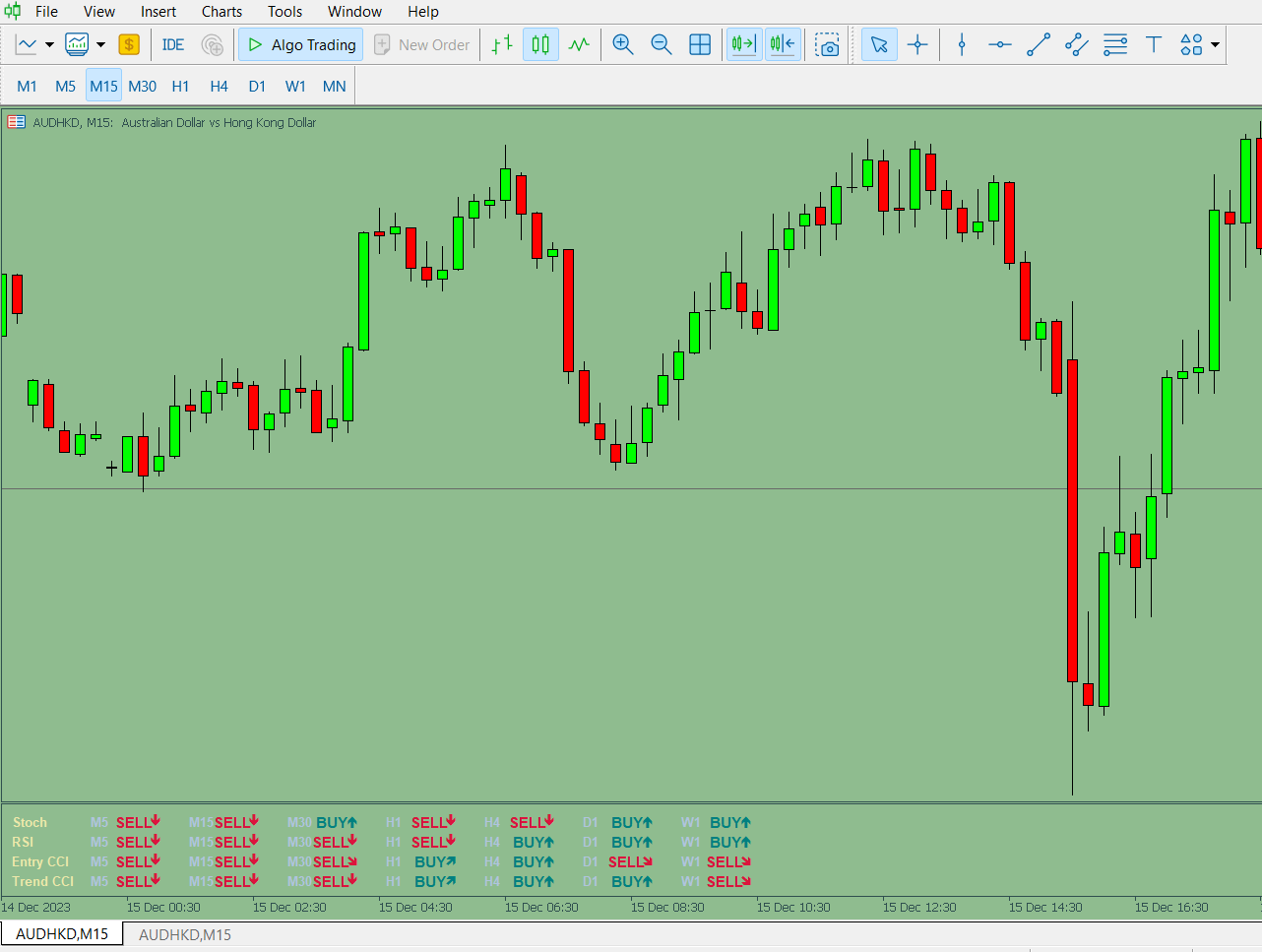
Key Features of the Trend Dashboard Indicator for MT5
Trend Dashboard Indicator MT5 scans nine timeframes (M1, M5, M15, M30, H1, H4, D1, W1, MN1) and summarizes trend direction using a combination of RSI, CCI, and Stochastic oscillator signals.
Instead of manually adding multiple indicators, traders get a single dashboard view that highlights whether short-term and long-term trends are aligned. This improves decision-making and helps reduce chart clutter.
With alert support enabled, traders can receive notifications when multiple timeframes align in the same direction, reducing the need for constant monitoring.
Traders who use multi-timeframe analysis may also find the MACD Multi Timeframe Panel Indicator MT4 useful for monitoring momentum across several chart periods, while the Guppy Indicator MT5 offers an alternative approach to trend strength and trend alignment analysis.
Trend Dashboard Indicator Trade Examples
Configuring Trend Dashboard Indicator Settings
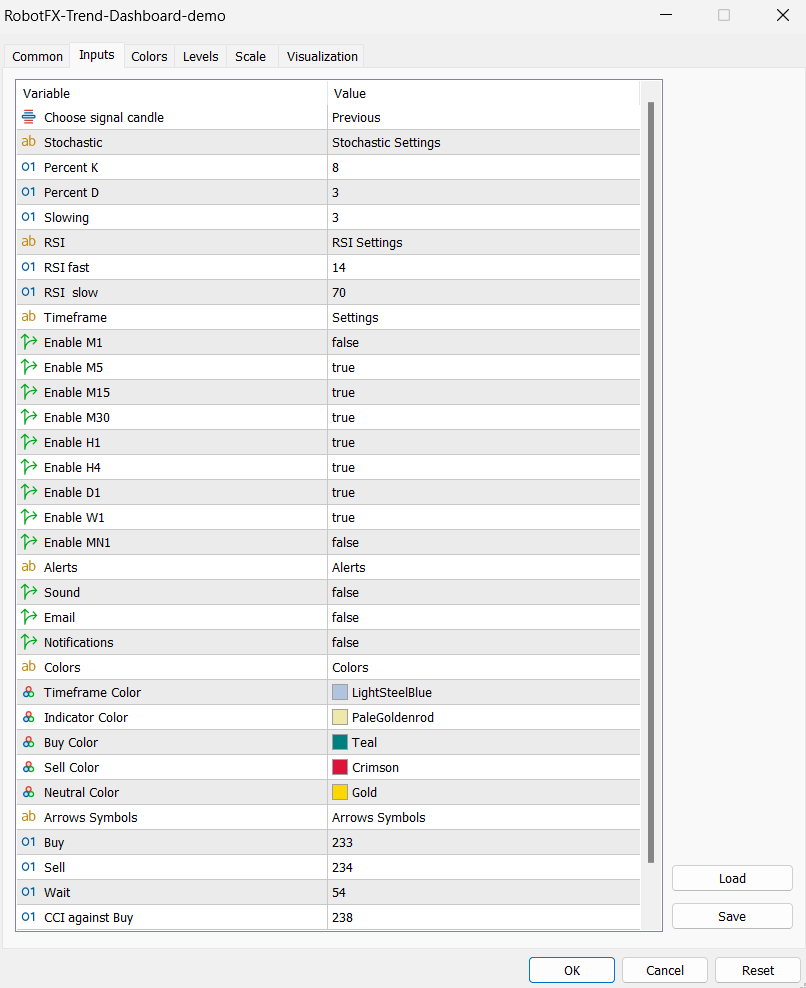
– Choose signal candle (default = Previous): Defines which candle is used for
calculations.
– Percent K (default = 8):
Stochastic
%K period.
– Percent D (default = 3): Stochastic %D smoothing.
– Slowing (default = 3): Stochastic smoothing factor.
– RSI fast (default = 14): Fast RSI period.
– RSI slow(default = 70): Slow
RSI
threshold.
– Enable (default = true/false): Enables or disables indicator signals.
– Sound (default = false): Enables alert sound notifications.
– Email (default = false): Sends email alerts via MT5 configuration.
– Notifications (default = false): Push notifications to mobile devices.
– Others: Visual settings including arrows, symbols, and display colors.
How to use Trend Dashboard Indicator MT5
Attach the indicator to any chart and monitor multiple timeframe alignment. When most timeframes show the same direction (buy or sell), it increases probability of a strong trend continuation.
FAQ – Trend Dashboard Indicator MT5
What makes this indicator useful?
It combines three oscillators into a single multi-timeframe dashboard view.
Can it replace
RSI
or
CCI?
Yes, it already integrates them into one system.
Is it suitable for beginners?
Yes, because it simplifies multi-timeframe analysis.
Does it support alerts?
Yes, including sound, email, and push notifications.
RobotFX Suggested Video
The video will explain how the RobotFX Auto Recovery works and the strategy behind the loss recovery. Feel free to watch the rest of the videos too.