CCI EA for MT5
MetaTrader Expert Advisor
The CCI Expert Advisor MT5 serves as a robust, enterprise-grade MetaTrader 5 Expert Advisor engineered to execute entirely hands-free Forex and CFD trading operations by leveraging the technical analytical power of the Commodity Channel Index (CCI indicator). This sophisticated, algorithmic MT5 trading robot systematically tracks, filters, and analyzes historical and real-time CCI indicator values across consecutive bars alongside candle Open and Close price structures, translating complex structural market data into precise, fully automated execution signals that eliminate human emotional bias from daily trade management.
Alternative download link Added to cart — redirecting to checkout in 3 seconds...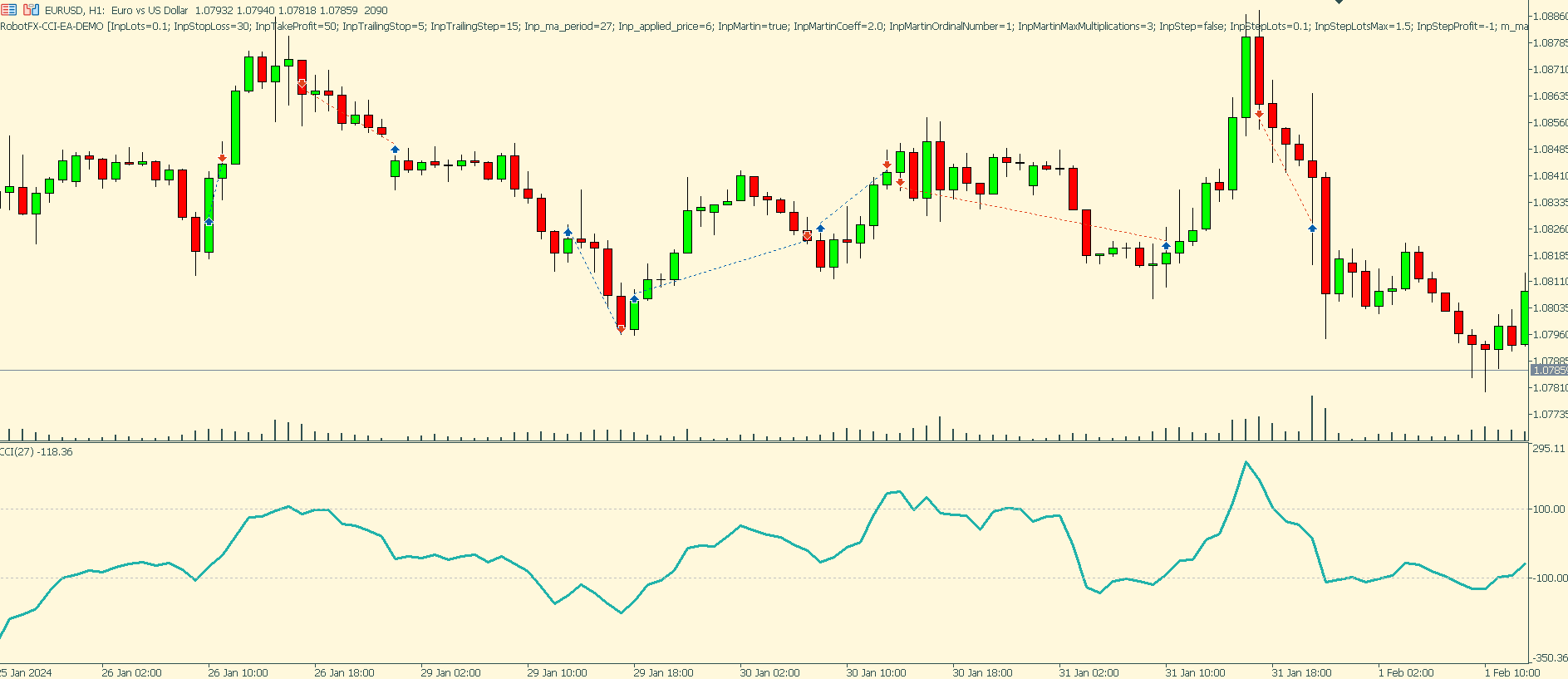
Key Features of the CCI EA for MT5
The CCI EA for MetaTrader 5 automates a popular CCI-based trading strategy by combining momentum analysis, trend detection, and trade management into one easy-to-use Expert Advisor. The system continuously scans the market for valid trading opportunities and executes positions automatically when predefined conditions are met.
This MetaTrader 5 Forex Expert Advisor is suitable for traders looking for a fully automated trading solution based on the Commodity Channel Index strategy. The EA includes trailing stop, martingale options, adjustable lot sizing, and advanced risk management controls for flexible automated trading.
CCI EA Trade Examples
A trade opening signal is checked when less than 20 seconds remain before the current candle closes and only if there are no other active trades opened by this Expert Advisor. The CCI indicator itself does not need to be attached to the chart because the EA performs all calculations internally. The chart below demonstrates how the Commodity Channel Index trading strategy operates inside MetaTrader 5.
How the CCI Expert Advisor MT5 Works
The CCI Expert Advisor for MetaTrader 5 uses the Commodity Channel Index to measure momentum and identify possible trend continuation or reversal opportunities. The EA evaluates the relationship between recent candle structures and CCI values to automatically determine trade entries.
- CCI Momentum Analysis – analyzes Commodity Channel Index values for automated signal generation.
- Automated Trade Entries – opens positions automatically when trading conditions are confirmed.
- Trend and Reversal Detection – suitable for both trend-following and reversal trading setups.
- Built-In Risk Management – includes stop loss, take profit, trailing stop, martingale controls, and dynamic lot management.
- MetaTrader 5 Compatibility – optimized specifically for MT5 trading platforms.
Configuring CCI EA Settings
The CCI Expert Advisor for MetaTrader 5 includes simple and flexible settings suitable for beginner and advanced Forex traders. Stop loss, take profit, trailing stop, and trailing step values are configured in pips.
There are three available methods for controlling trade lot size and money management:
- Lots – fixed lot size value defined manually by the trader.
- Martingale Option – automatically increases lot size after losing trades based on the configured multiplier and maximum recovery levels.
- Increase Lotsize – progressively adjusts trade size in steps depending on winning or losing trade sequences.
For alternative execution styles, similar risk scaling logic can be found in systems like the Grid Expert Advisor MT4, which also manages multiple position layers based on market movement. Advanced recovery-style trade handling is also used in tools such as the Auto Recovery Expert Advisor MT4/MT5, which focuses on structured drawdown recovery strategies.
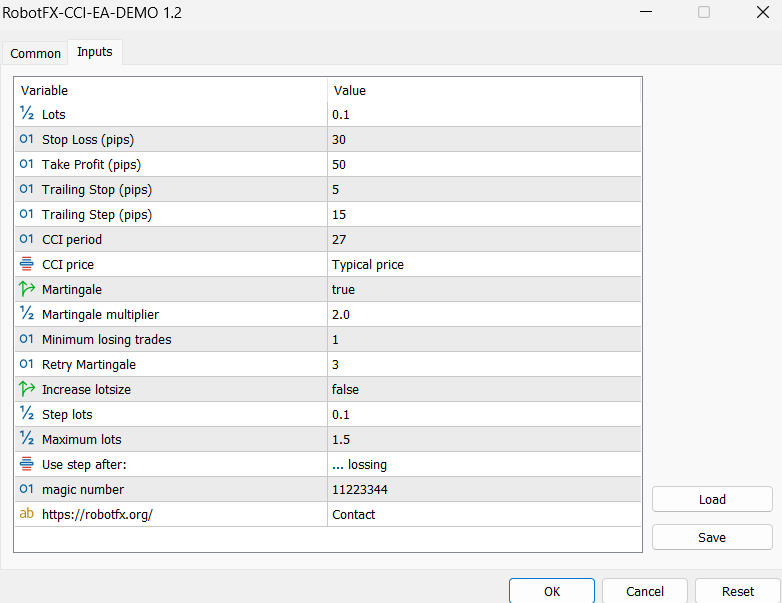
As a general recommendation, traders should avoid using both the Martingale and Increase Lotsize methods simultaneously because combining aggressive money management systems may significantly increase trading risk. However, experienced traders may customize these settings according to their own risk tolerance and account strategy.
The test results shown below demonstrate that the CCI Expert Advisor MT5 can produce profitable trading results when configured properly. However, profitability is never guaranteed because trading performance depends on market conditions, broker execution quality, internet stability, volatility, and overall risk management. Related execution systems include the Trailing Stop Expert Advisor MT4/MT5 and Scalper Expert Advisor MT5, which are also sensitive to execution quality and market volatility.

How to Trade Forex Using the CCI Indicator
The Commodity Channel Index (CCI indicator) is a widely used technical analysis indicator designed to identify trends, momentum, overbought conditions, oversold conditions, and possible market reversals. Developed by Donald Lambert, the CCI indicator measures how far current price deviates from its statistical average.
The CCI indicator oscillates around a zero centerline and typically moves between +100 and -100. Readings above +100 often indicate strong bullish momentum, while readings below -100 may signal strong bearish pressure.
How to Use the CCI Indicator for Trend Trading
One of the most popular uses of the CCI indicator is identifying trend direction and momentum strength. Positive CCI readings suggest upward momentum, while negative readings indicate downward market pressure.
Many Forex traders use CCI values above +100 to confirm bullish trends and values below -100 to confirm bearish trends. The indicator can also generate trend reversal signals through bullish and bearish divergences between price action and the CCI oscillator.
How to Use the CCI Indicator for Overbought and Oversold Trading
The CCI indicator can also help traders identify overbought and oversold market conditions. Extremely high or low readings may indicate that price has moved too far away from its average and could be preparing for a correction or reversal.
Traders can use the CCI indicator as either a trend-following system or a counter-trend trading strategy depending on market conditions. Combining the CCI indicator with support and resistance levels, candlestick analysis, and trendlines may improve signal accuracy and reduce false entries.
Conclusion
The CCI Expert Advisor MT5 is a versatile automated trading robot for MetaTrader 5 that simplifies Commodity Channel Index trading by automating signal detection, order execution, and trade management. Related automation systems include the MACD Expert Advisor MT4 and Bollinger Bands Expert Advisor MT5, which also use momentum and volatility-based strategies for automated trading decisions.
How To Use the CCI Expert Advisor MT5
- Download and install the CCI Expert Advisor into your MetaTrader 5 Experts folder.
- Restart MetaTrader 5 or refresh the Navigator panel.
- Attach the EA to your preferred Forex or CFD chart.
- Enable AutoTrading in MetaTrader 5.
- Adjust stop loss, take profit, trailing stop, and lot management settings according to your risk tolerance.
- Test the Expert Advisor on a demo account before using it on a live trading account.
- Monitor market conditions and optimize settings when necessary.
FAQ – CCI Expert Advisor MT5
What is the CCI Expert Advisor MT5?
It is an automated MetaTrader 5 trading robot that uses the Commodity Channel Index (CCI) indicator to generate buy and sell trading signals.
Does the EA work on MetaTrader 4?
No, this version was specifically developed for MetaTrader 5 (MT5).
What indicators does the EA use?
The EA uses the Commodity Channel Index (CCI) indicator combined with recent candle price analysis.
Does the Expert Advisor include money management tools?
Yes, the EA includes fixed lot sizing, martingale options, trailing stop, stop loss, take profit, and progressive lot increase systems.
Can the EA be used on any currency pair?
Yes, the CCI Expert Advisor MT5 can be used on most Forex pairs and CFD instruments available in MetaTrader 5.
Is the free version limited?
The free downloadable version is fully functional for unlimited demo accounts. Live trading versions are limited to activation on up to 5 live accounts, which can be changed periodically if needed.
RobotFX Suggested Video
The video will explain how the RobotFX Auto Recovery works and the strategy behind the loss recovery. Feel free to watch the rest of the videos too.