Bollinger Bands EA MT5
MetaTrader Expert Advisor
The Bollinger Bands Expert Advisor MT5 is a professional MetaTrader 5 Expert Advisor designed for automated Forex and CFD trading using the built-in Bollinger Bands indicator. Developed specifically for the advanced MT5 architecture, this powerful MT5 trading robot continuously monitors volatile currency and commodity charts to automatically detect Bollinger Bands breakout, reversal, and middle band crossover signals to execute trades with precision.
Alternative download link Added to cart — redirecting to checkout in 3 seconds...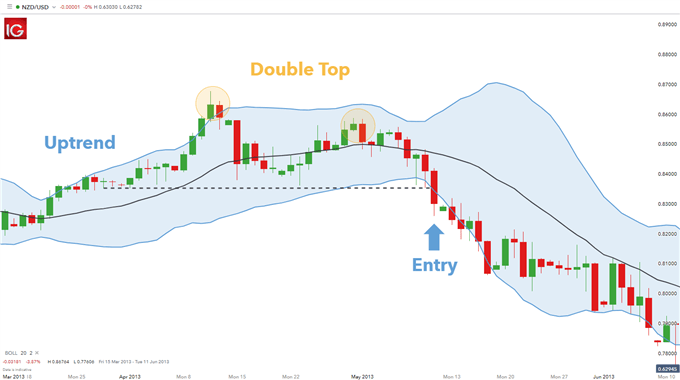
Key Features of the Bollinger Bands EA for MT5
The Bollinger Bands EA for MetaTrader 5 can trade both trending and ranging market conditions by analyzing the interaction between price action and the upper, lower, and middle Bollinger Bands levels. The EA provides flexible entry logic, advanced risk management, and fully automated order execution suitable for beginner and advanced traders.
This MetaTrader 5 automated trading system allows traders to customize breakout strategies, reversal entries, trailing stop management, stop loss, take profit, and trend filtering directly inside MT5. Traders interested in combining Bollinger Bands with momentum confirmation may also explore the Bollinger RSI Expert Advisor, while those looking for advanced breakout filtering can compare it with the Tech Trader Expert Advisor.
Bollinger Bands EA Trade Examples
There are several popular ways to trade using the Bollinger Bands indicator. The EA supports breakout trading, reversal trading, and middle band crossover strategies.
- Price Breakout Strategy – opens buy trades whenever the price breaks above the upper Bollinger Band and opens sell trades when the price drops below the lower Bollinger Band. Traders who specialize in breakout systems may also be interested in the Consolidation Zone Expert Advisor and the Price Channel Expert Advisor.
- Price Reversal Strategy – opens long trades when the price bounces upward from the lower Bollinger Band and opens short trades when the price reverses downward from the upper Bollinger Band.
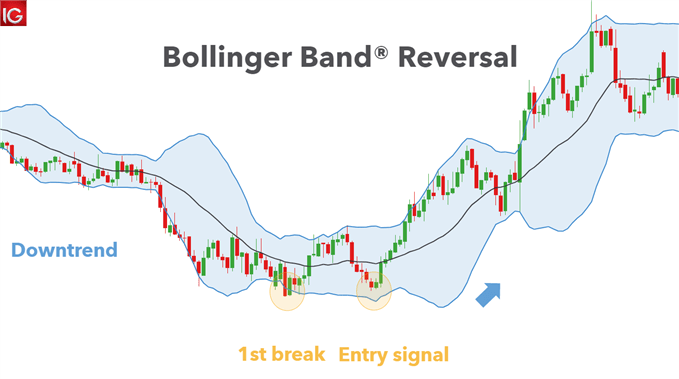
Another popular Bollinger Bands strategy is trading the middle band crossover. The EA can automatically open buy trades when the price crosses above the middle Bollinger Band and sell trades when the price crosses below it.
Besides trade entries, the Bollinger Bands indicator can also help identify the overall market trend. A rising Bollinger Bands channel often indicates an uptrend, while a falling channel signals a downtrend. Trading in the direction of the prevailing trend can improve trading accuracy and reduce unnecessary risks. Traders looking for additional trend confirmation tools may find the Trend Dashboard Indicator, Guppy Indicator, or ATR Trend Channel Indicator useful.
How the Bollinger Bands Expert Advisor MT5 Works
The Bollinger Bands Expert Advisor for MetaTrader 5 continuously monitors price movement around the Bollinger Bands and automatically executes trades according to the configured strategy.
- Breakout Detection – detects strong bullish and bearish price breakouts outside the Bollinger Bands. Traders interested in breakout-focused systems may also explore the Consolidation Zone Expert Advisor and Price Channel Expert Advisor.
- Reversal Trading – identifies possible reversals from overbought and oversold market conditions. Similar mean-reversion concepts are also used by the Bollinger RSI Expert Advisor.
- Middle Band Crossovers – trades momentum shifts when price crosses the middle moving average.
- Trend Identification – helps filter trades according to the overall market direction. Additional trend analysis can be performed using the Trend Dashboard Indicator or the Guppy Indicator.
- Advanced Risk Management – supports stop loss, take profit, trailing stop, and trade filtering settings. Traders looking for dedicated trade management tools may also consider the Trailing Stop Expert Advisor.
Configuring Bollinger Bands EA Settings
The Bollinger Bands EA MT5 settings allow traders to customize entry conditions and optimize automated trading performance according to their own strategy and risk tolerance.
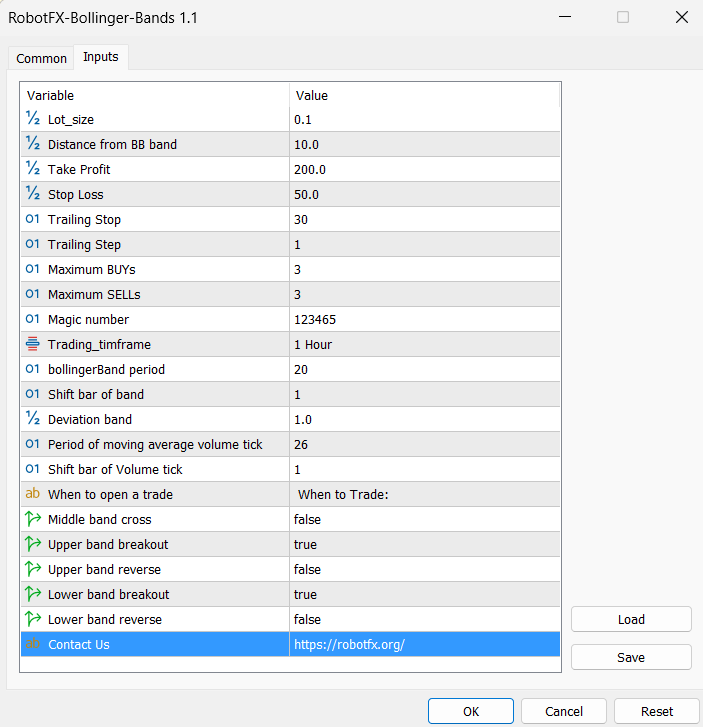
- Distance from BB Band – filters weak or false signals by requiring the price to move a minimum distance away from the Bollinger Band before opening a trade. Setting the value to 0 disables this filter.
- Maximum Buys/Sells – controls the maximum number of buy or sell trades allowed simultaneously on the same chart.
- Middle Band Cross – opens trades when the price crosses the Bollinger Bands middle line.
- Upper Band Breakout – opens buy trades when the price closes above the upper Bollinger Band.
- Upper Band Reverse – opens sell trades when the price reverses downward from the upper Bollinger Band.
- Lower Band Breakout – opens sell trades when the price closes below the lower Bollinger Band.
- Lower Band Reverse – opens buy trades when the price bounces upward from the lower Bollinger Band.
What Are Bollinger Bands?
Bollinger Bands, created by John Bollinger in the 1980s, are one of the most popular technical indicators used in Forex and CFD trading. The indicator measures market volatility and identifies possible overbought or oversold market conditions.
The Bollinger Bands indicator consists of three main components:
- Middle Band – usually a 20-period Simple Moving Average (SMA).
- Upper Band – calculated using the middle band plus standard deviations.
- Lower Band – calculated using the middle band minus standard deviations.
The distance between the bands changes dynamically according to market volatility. During high volatility periods, the bands expand. During low volatility periods, the bands contract.
Bollinger Bands Trading Strategies
- The Squeeze Strategy – identifies low volatility periods before potential large market movements.
- Breakout Trading – enters trades when price breaks above or below the Bollinger Bands.
- Reversal Trading – identifies possible overbought and oversold conditions near the bands.
- Double Bollinger Bands – uses multiple Bollinger Band levels for stronger signal confirmation.
The Bollinger Bands Expert Advisor MT5 automates these popular trading strategies and helps traders execute trades consistently without emotional decision-making.
How To Use the Bollinger Bands Expert Advisor MT5
- Download and install the MetaTrader 5 Expert Advisors into the MetaTrader 5 Experts folder.
- Restart MetaTrader 5 or refresh the Navigator panel.
- Attach the Bollinger Bands Expert Advisor MT5 to a Forex or CFD chart.
- Enable AutoTrading inside MetaTrader 5.
- Configure stop loss, take profit, breakout distance, and trade direction settings.
- Select whether to trade breakouts, reversals, or middle band crossovers.
- Test the EA on a demo account before using it on live trading accounts.
FAQ – Bollinger Bands Expert Advisor MT5
What is the Bollinger Bands Expert Advisor MT5?
It is an automated MetaTrader 5 trading robot that trades using Bollinger Bands breakout, reversal, and middle band crossover strategies.
Does the EA work on MetaTrader 4?
No, this version was specifically developed for MetaTrader 5 (MT5).
Can the EA trade both trends and reversals?
Yes, the EA supports breakout trading, reversal trading, and middle band crossover trading strategies.
Does the Expert Advisor include risk management?
Yes, the EA supports stop loss, take profit, trailing stop, maximum trades filtering, and entry signal filtering.
Can I use the EA on any currency pair?
Yes, the Bollinger Bands EA MT5 can be used on most Forex pairs and CFDs available in MetaTrader 5.
Is the free version limited?
The free downloadable version is fully functional for unlimited demo accounts. Live trading versions are limited to activation on up to 5 live accounts, which can be changed periodically if needed.
RobotFX Suggested Video
The video will explain how the RobotFX Auto Recovery works and the strategy behind the loss recovery. Feel free to watch the rest of the videos too.