Consolidation Zone EA MT5
MetaTrader Expert Advisor
The Consolidation Zone Expert Advisor MT5 is a professional MetaTrader 5 Expert Advisor designed to automatically identify and trade consolidation zone breakouts in the Forex and CFD markets. This intelligent MT5 trading robot was released as a simpler and more user-friendly alternative to the popular Stairsteps EA for MT4, while preserving the core breakout trading logic used by professional traders.
Alternative download link Added to cart — redirecting to checkout in 3 seconds...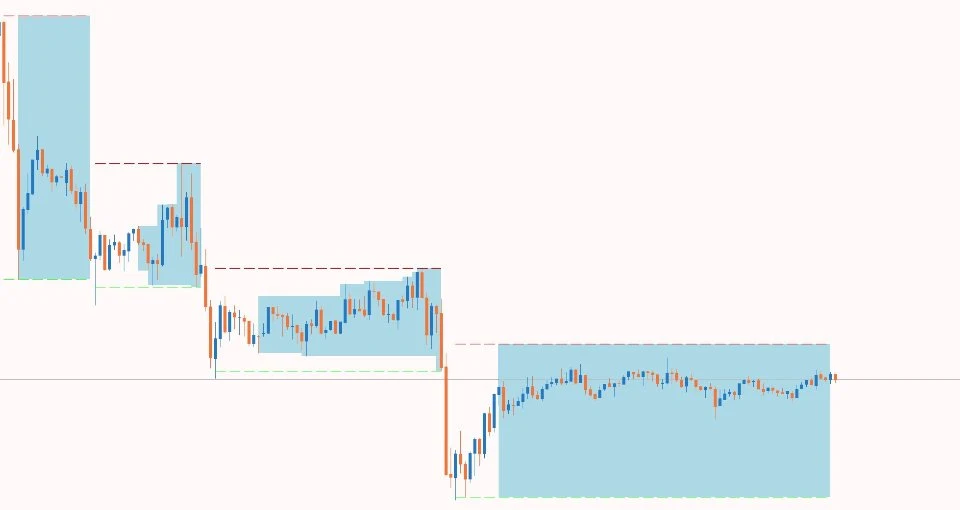
Key Features of the Consolidation Zone EA for MT5
The Consolidation Zone EA for MetaTrader 5 automatically scans the market for periods of sideways price action where support and resistance levels form a clearly defined consolidation range. Once the EA detects a breakout above or below the consolidation zone, it executes trades automatically based on the configured risk management and trading parameters.
This automated Forex breakout Expert Advisor for MT5 is suitable for traders who want to capture strong market movements after periods of low volatility and accumulation. The EA works on multiple currency pairs and timeframes and can be optimized for different trading styles.
Related tools for volatility and breakout trading include Price Channel Expert Advisor, ATR Trend Channel Indicator, and Trend Dashboard Indicator.
Consolidation Zone EA Trade Examples
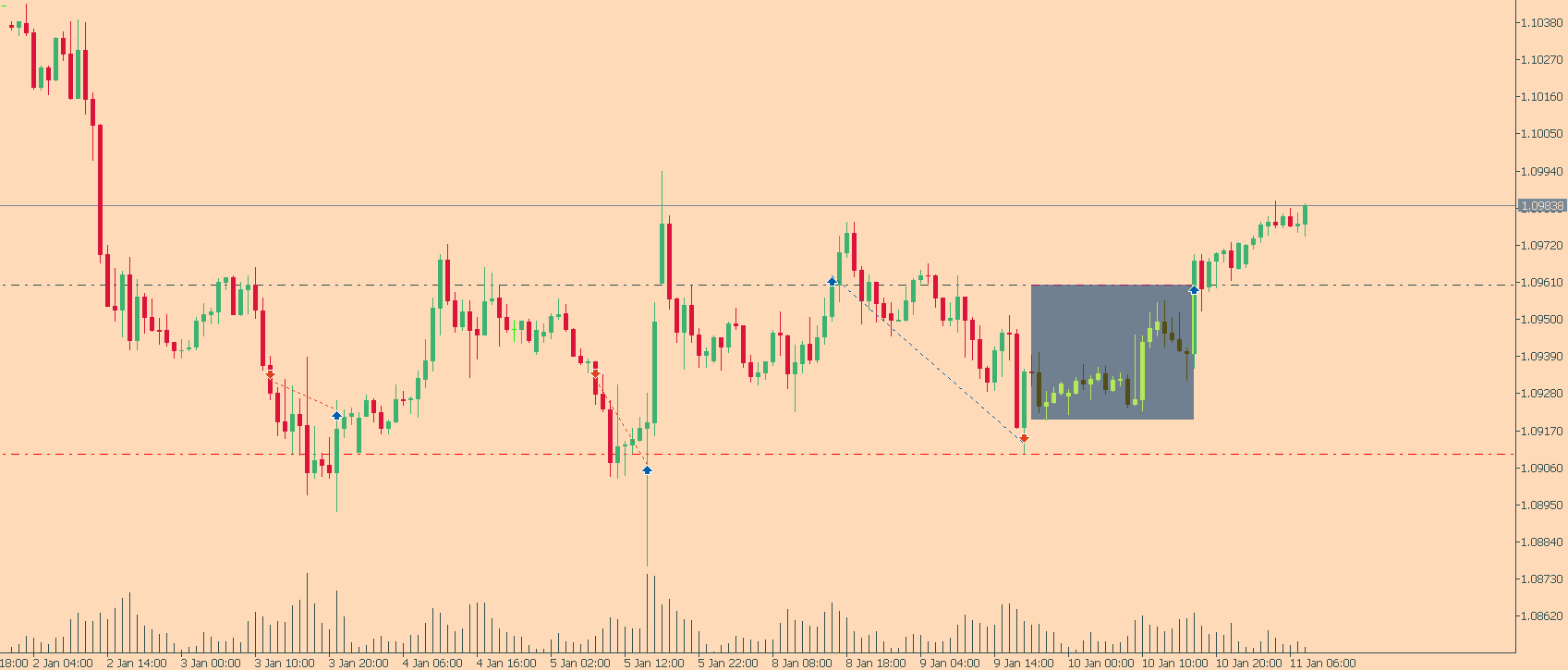
The EA can trade consolidation zone breakouts regardless of the overall market trend. Unlike many trend-following systems, the Consolidation Zone Expert Advisor for MT5 focuses entirely on identifying valid consolidation structures and breakout opportunities based on price action behavior. The algorithm is specifically designed to detect these zones automatically and execute trades as soon as breakout conditions are confirmed.
This approach is similar in logic to volatility breakout systems such as the Price Channel Expert Advisor and can be further enhanced when combined with tools from the MetaTrader 5 Expert Advisors category for broader strategy diversification.
For traders who also use multi-indicator confirmation systems, combining consolidation breakout logic with trend confirmation tools like the Traders Dynamic Index Expert Advisor can help filter false breakouts and improve entry timing during low-volatility market phases.
Configuring Consolidation Zone EA Settings
How the Consolidation Zone Expert Advisor MT5 Works
The EA continuously monitors the market for periods where price consolidates inside a narrow range. During these periods, the market creates temporary support and resistance levels that often lead to strong breakout movements. Once price breaks above resistance or below support, the EA automatically opens buy or sell trades based on the breakout direction.
- Automatic Consolidation Zone Detection – identifies ranging market structures and breakout zones.
- Breakout Trading Logic – executes trades when price leaves the consolidation range.
- Risk Management Features – includes stop loss, take profit, breakeven, trailing stop, and trade management tools.
- Multi-Pair Compatibility – works on Forex pairs, CFDs, indices, and other MetaTrader 5 instruments.
- Fully Automated Trading – suitable for traders looking for hands-free breakout trading on MT5.
The breakout logic is conceptually similar to volatility expansion systems such as the Bollinger Bands Expert Advisor MT5, where compression phases often precede strong directional moves.
It also shares structural similarities with trend-confirmation tools like the Trend Dashboard Indicator, which helps traders visually confirm whether consolidation is occurring within a broader directional bias.
For additional confirmation of ranging vs trending conditions, the Support & Resistance Indicator MT5 can be used to validate consolidation zones before breakout execution.
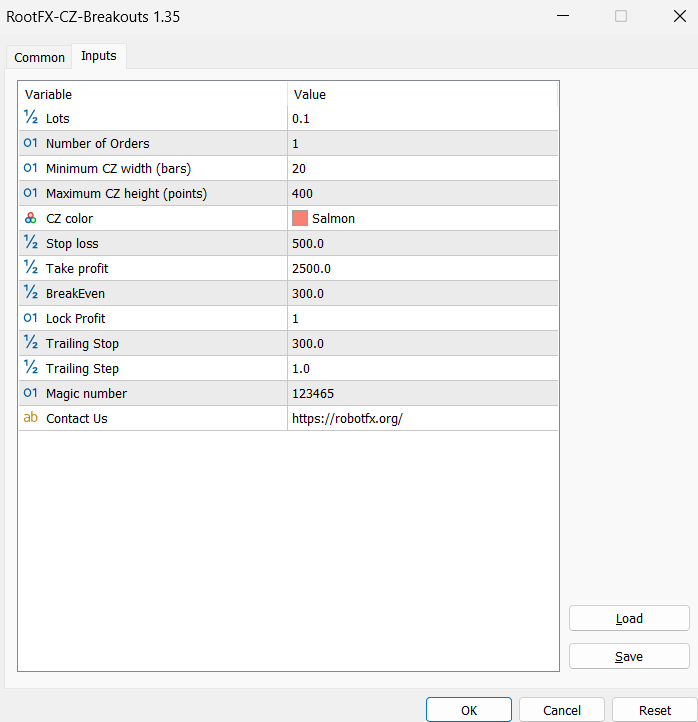
The Consolidation Zone Expert Advisor MT5 offers a range of customizable settings to suit different breakout trading strategies and market conditions. Here is a breakdown of the main parameters available inside the MetaTrader 5 Expert Advisor:
- Lots – determines the lot size per trade
- Number of orders – maximum number of opened trades on the same chart
- Minimum CZ width – the minimum number of bars required to define a consolidation zone
- Maximum CZ height – the maximum height in points allowed between the lowest low and highest high inside the consolidation range
- CZ color – select the rectangle color used for visualizing the consolidation zone
- Stop loss – defines the stop loss level for opened trades
- Take profit – defines the take profit level for opened trades
- Breakeven – the minimum favorable distance required before moving stop loss to breakeven
- Lock profit – defines the profit distance where the breakeven stop loss will be placed
- Trailing Stop – automatically trails the stop loss as price moves into profit
- Trailing Step – controls how often the trailing stop updates in steps
- Magic number – unique identifier assigned to all trades opened by the EA for monitoring and management
This parameter structure is similar to other risk-controlled systems like the Auto Recovery Expert Advisor MT4/MT5, which also relies on strict trade management rules to handle drawdowns and position control.
Many traders also combine consolidation breakout systems with volatility tools such as the Price Channel Expert Advisor to better define breakout boundaries and improve entry timing.
About Consolidation Zone Breakout Trading
Trading consolidation zone breakouts is one of the most widely used price action trading strategies in Forex and CFD markets. A consolidation zone forms when price moves sideways within a tight range before making a significant directional move. Traders often monitor these zones because strong breakouts frequently occur after periods of low volatility and accumulation.
The Consolidation Zone Expert Advisor for MetaTrader 5 automates the entire breakout trading process by identifying support and resistance levels, monitoring breakout conditions, and executing trades automatically when price exits the consolidation area. Traders can combine the EA with additional technical indicators, Fibonacci levels, or custom risk management strategies for even greater flexibility.
How To Use the Consolidation Zone Expert Advisor MT5
- Download and install the Consolidation Zone EA into your MetaTrader 5 Experts folder.
- Restart MetaTrader 5 or refresh the Navigator panel.
- Attach the EA to your preferred Forex or CFD chart.
- Enable AutoTrading in MetaTrader 5.
- Configure lot size, stop loss, take profit, and breakout zone parameters.
- Use proper money management and test the EA on a demo account before live trading.
- Monitor trading sessions with higher volatility for stronger breakout opportunities.
This setup process is similar to other automated systems like the NonLagMA Expert Advisor MT4/MT5, which also requires correct indicator configuration and proper trend or breakout alignment before live execution.
For traders using multiple systems, combining it with structured automation tools from the MetaTrader 5 Expert Advisors category can help build a diversified portfolio of strategies across different market conditions.
FAQ – Consolidation Zone Expert Advisor MT5
What is the Consolidation Zone Expert Advisor MT5?
It is an automated MetaTrader 5 Expert Advisor designed to identify consolidation zones and trade breakout opportunities automatically.
Does the EA work on MetaTrader 4?
No, this version was specifically developed for MetaTrader 5 (MT5).
What strategy does the EA use?
The EA uses consolidation zone breakout trading based on support and resistance levels formed during sideways market movement.
Can the EA trade any currency pair?
Yes, the Consolidation Zone MT5 EA can be used on most Forex pairs, CFDs, and indices supported by MetaTrader 5.
Does the EA include risk management tools?
Yes, the EA includes stop loss, take profit, breakeven, trailing stop, and customizable trade management settings.
Is the free version limited?
The free downloadable version is fully functional for unlimited demo accounts. Live trading versions are limited to activation on up to 5 live accounts, which can be changed periodically if needed.
RobotFX Suggested Video
The video will explain how the RobotFX Auto Recovery works and the strategy behind the loss recovery. Feel free to watch the rest of the videos too.