Grid EA for MT4
MetaTrader Expert Advisor
The MetaTrader Grid EA for MT4 functions as a sophisticated, automated trading solution engineered to integrate a robust grid trading strategy with advanced trend detection via moving averages and Stochastic confirmation. By synthesizing these technical indicators, the expert advisor ensures that grid entries are aligned with the prevailing market momentum, significantly enhancing trade precision. Furthermore, the system is equipped with the capability to automatically hedge losing positions during sudden market reversals, providing an essential layer of risk mitigation. This proactive management approach assists traders in maintaining greater account stability and exercising superior control over exposure, even during periods of increased market volatility.
Alternative download link Added to cart — redirecting to checkout in 3 seconds...
Key Features of the Grid EA for MT4
- Trend detection system: Uses moving average direction to identify bullish or bearish market conditions.
- Stochastic entry confirmation: Filters entries for higher precision timing.
- Advanced grid strategy: Customisable grid distance, lot size, and trade levels.
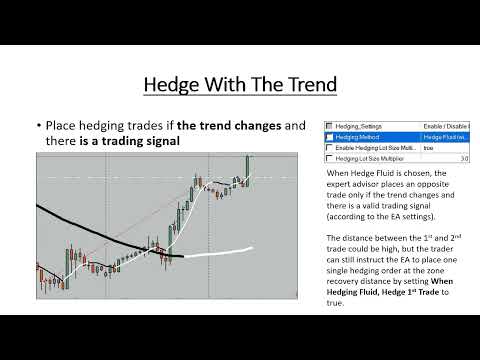
- Hedging recovery system: Opens opposite trades in recovery zones to reduce drawdown.
- Full risk management: Stop-loss, take-profit, trailing stop, and break-even functions included.
The RobotFX Grid EA is a professional MetaTrader MT4 and MT5 expert advisor that implements an advanced grid trading strategy. Unlike typical grid EAs, it opens trades based on price action, detects trends, and hedges during market reversals using a recovery zone. Traders interested in other automation styles can also explore the Traders Dynamic Index Expert Advisor for MT4, which uses multi-indicator confirmation instead of grid logic. Traders can customize hedging lot sizes to maximize risk management and profit potential. This makes the Grid EA more flexible and adaptive compared to standard grid trading expert advisors.
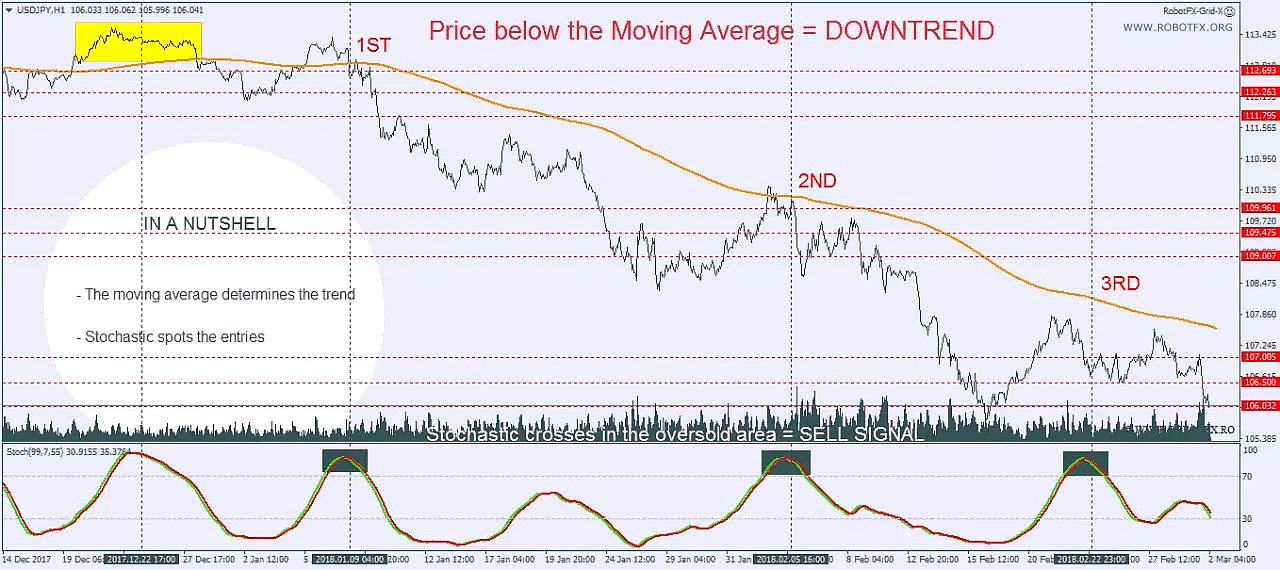
The RobotFX Grid EA is a professional MetaTrader MT4 and MT5 expert advisor that manages lotsizes safely while trading a grid strategy. Unlike classic grid trading, which often increases lotsizes in a martingale-like approach leading to losses during reversals, RobotFX Grid EA dynamically adjusts lotsizes for both initial and hedging trades. Trades are opened according to the detected trend: long trades in uptrends and short trades in downtrends, with entry signals confirmed by the Stochastic oscillator or customizable indicators like MA crossovers and PSAR. Traders interested in other confirmation-based systems may also review the MACD Expert Advisor for MT4, which uses momentum-based crossover logic instead of grid positioning.
In a downtrend (price below the moving average), the EA opens only short trades. Stochastic ensures precise entries when crossing the overbought zone, and the opposite occurs for long trades in uptrends.
This combination of advanced grid trading strategy, trend detection, and hedging enables traders to maximize profits while minimizing losses, making RobotFX Grid EA a reliable and professional solution for MetaTrader MT4 and MT5 users.
Grid EA Trading Examples
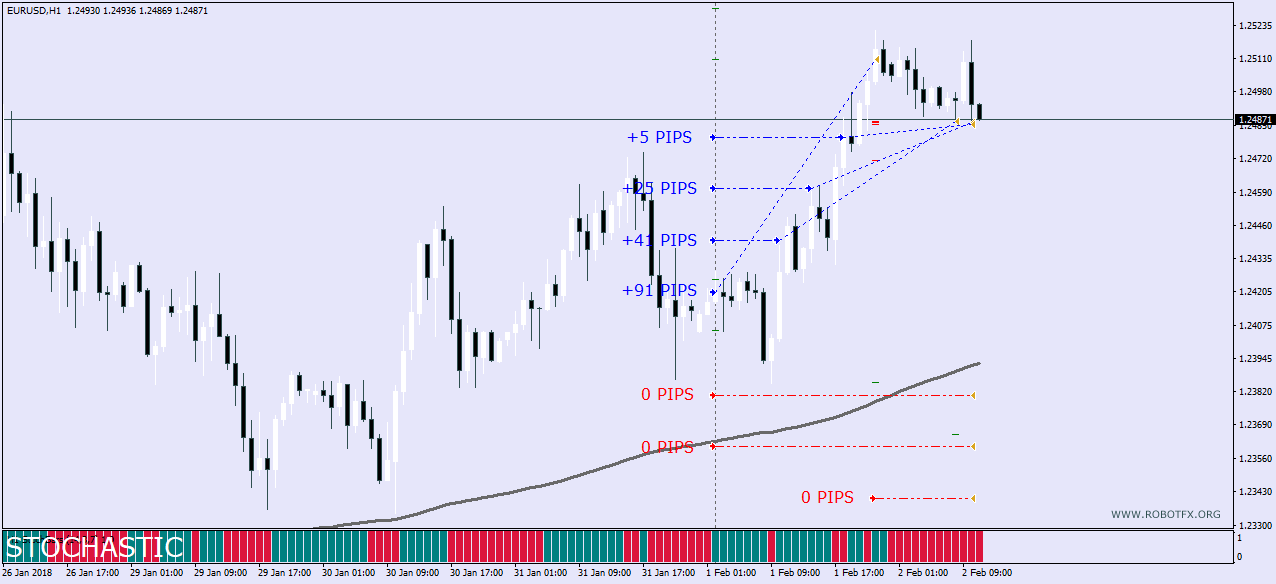
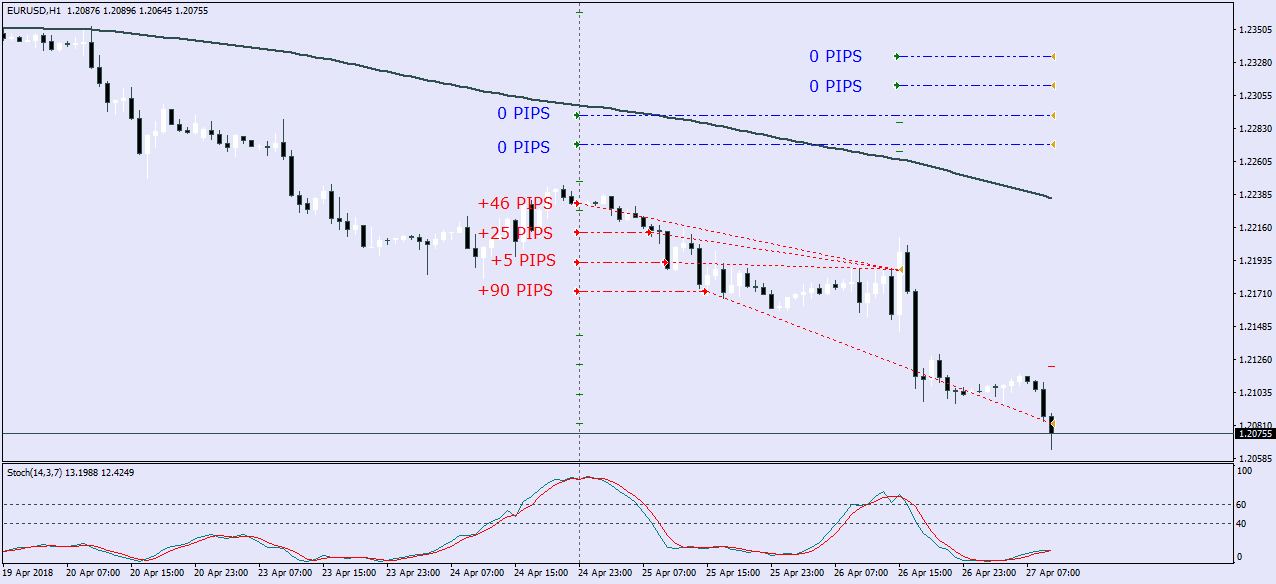
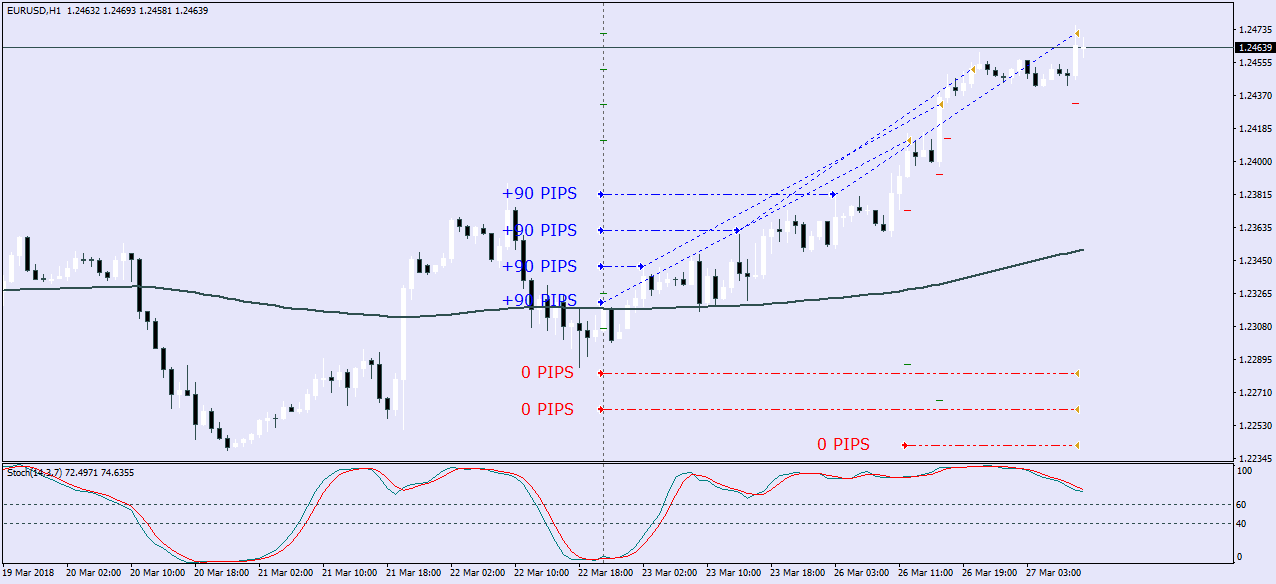
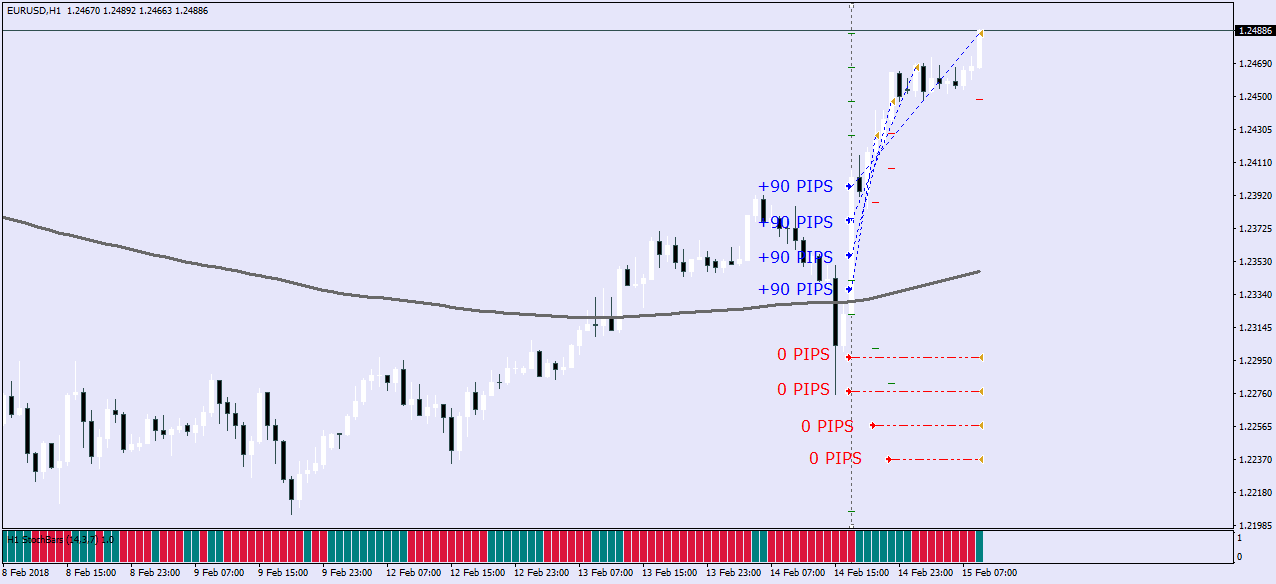
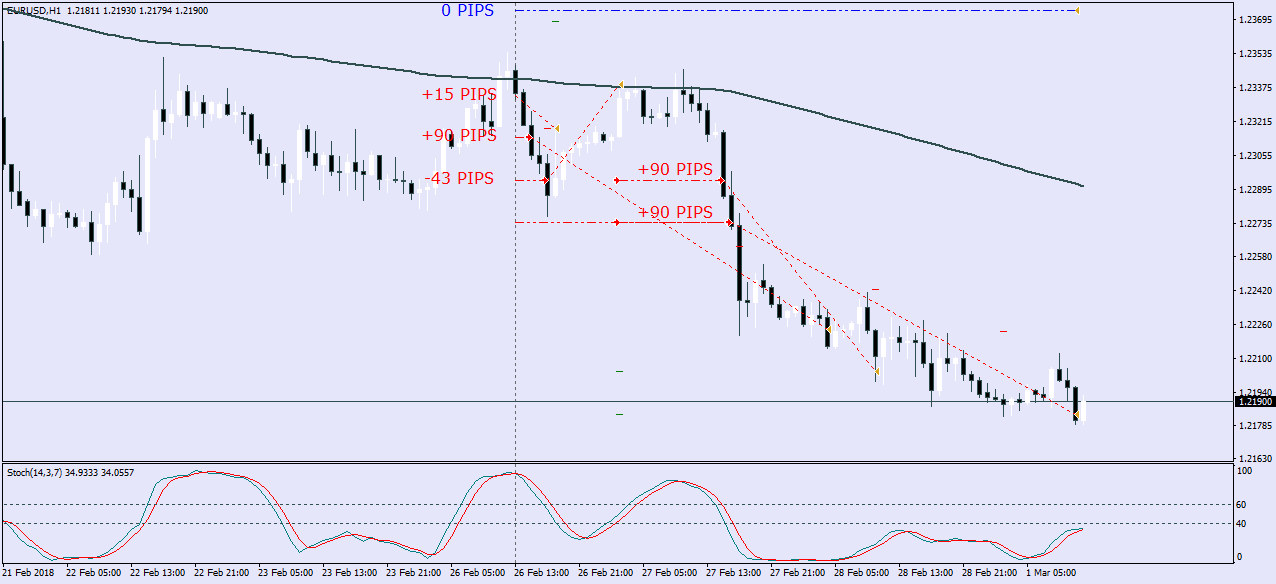
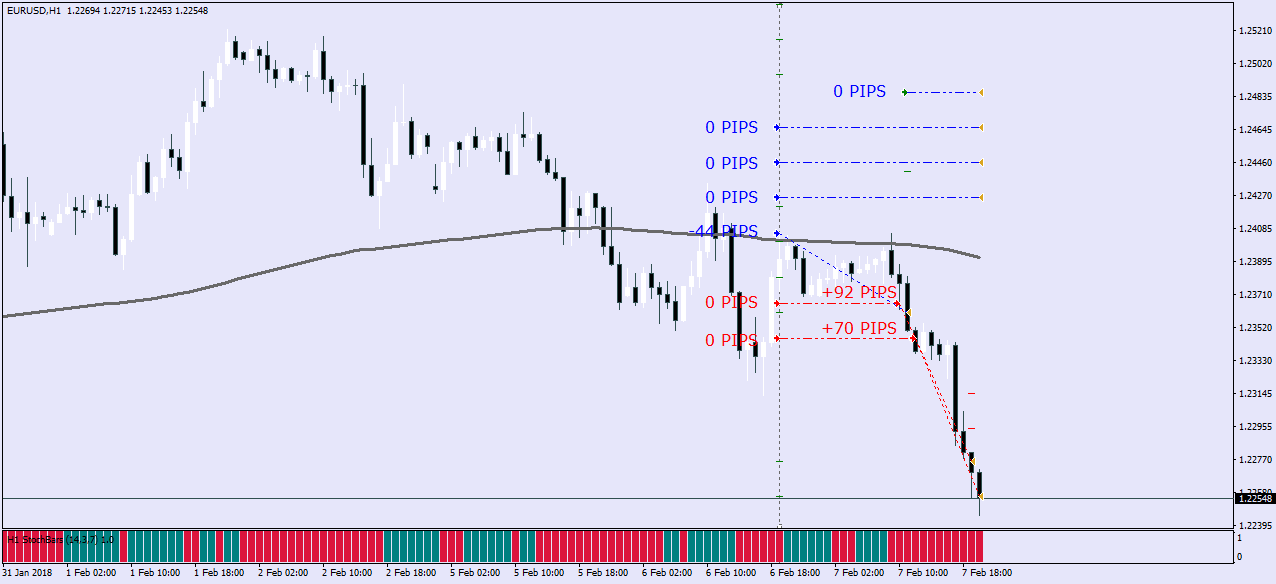
Thanks to the advanced hedging capabilities, RobotFX Grid EA simplifies trade management on MetaTrader MT4 and MT5. Traders can easily customize:
- Stop-loss, take-profit, trailing stop, and break-even settings
- Number of grid trades and hedging trades
- Distance between grid trades and the start of hedging (recovery zone)
These flexible options allow traders to implement professional grid trading strategies, reduce potential losses, and maximize overall profitability. Traders looking for alternative risk-controlled automation may also explore the Trailing Stop Expert Advisor for MT4 and MT5, which focuses on dynamic profit protection instead of grid recovery logic.
Configuring Grid EA Settings
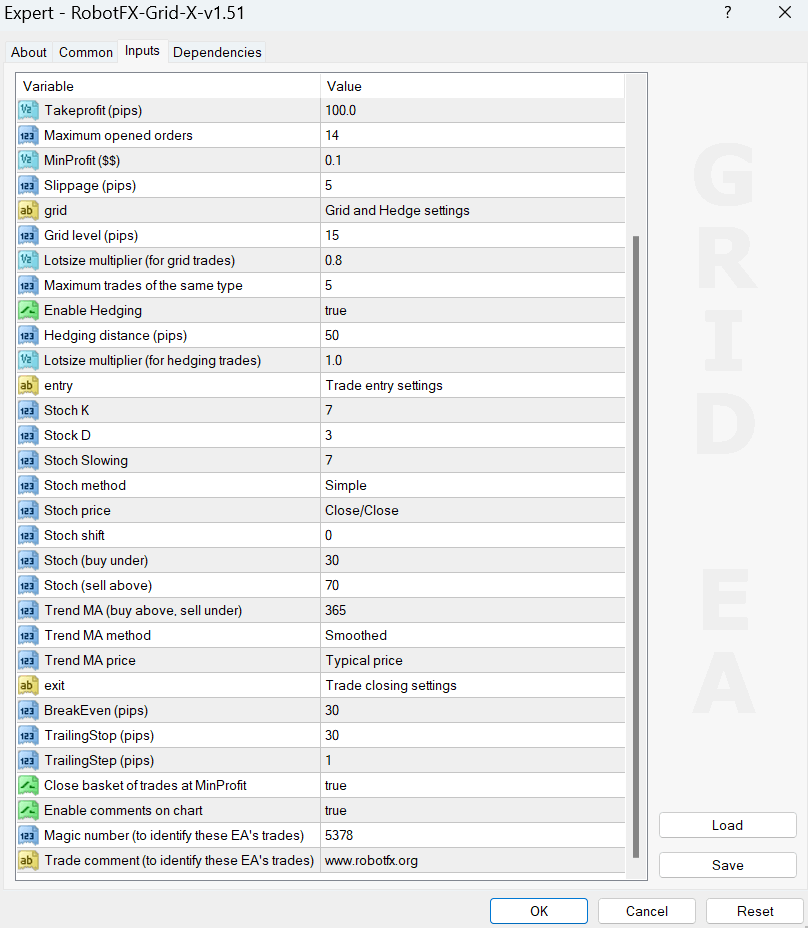
- Enter your Client Email - fill this with your email IF you are using a paid version of this EA on a LIVE account
- LotSize - the lotsize of the first trade of the grid (if MoneyManagement is disabled)
- Enable Stoploss and Takeprofit - if disabled, the EA will not place stop-loss or take-profit
- Stoploss (pips) - distance from the opened price where the stop-loss will be placed
- Takeprofit (pips) - distance from the opened price where the take-profit will be placed
- Maximum opened orders - the number of trades allowed to be placed on a chart
- MinProfit ($$) - if “Close basket of trades at MinProfit” is enabled and there are opened opposite trades on the chart (buys and sells), the EA will close all of them when their profit reaches this amount
- Slippage (pips) - the maximum distance, in pips, allowed for the price to move between sending a trade order to the server and execution (by the broker’s server)
- Enable lotsize management - enable in order to use a percentage of the equity to trade, instead of the LotSize (above)
- Percentage of equity to trade - set the percentage of equity to trade when the above is enabled (0.01 = 1%)
- Grid level (pips) - the distance between the trades of the same kind (the grid trades)
- Lotsize multiplier (for grid trades) - use this multiplier to increase or decrease the lotsize of the grid trades
- Maximum trades of the same type - restricts the EA from opening more than this number of trades for each type of trades (buys or sells)
- Enable Hedging - whether or not to enable hedging. Hedging is opening opposite trades used to counter losses from a losing trade. Traders may also compare this with the Auto Recovery Expert Advisor for MT4 and MT5 for more advanced recovery logic.
- Hedging distance (pips) - the distance (from the first opened trade) in pips where hedging (placing opposite trades) will start
- Lotsize multiplier (for hedging trades) - use this multiplier to increase or decrease hedging trade size. Hedging trades are also restricted by the “Maximum trades of the same type” above.
- Trade entry settings - these are self-explanatory and used to define the trend and the first trade entry
- Trend MA (buy above, sell under) - defines the trend, and the EA will only open buy trades if the price is above this moving average, and sells if the price is below it
- “Stoch (buy under)” opens a trade when Stochastic crosses under this level, while “Stoch (sell above)” opens a sell trade when the price crosses above this level
- BreakEven (pips) - when price moves away from the opening price this distance in pips, the EA moves stop-loss to break-even level
- TrailingStop (pips) - sets stop-loss at break-even once price moves this distance (plus spread)
- TrailingStep (pips) - moves stop-loss following price at defined trailing distance once condition is met
- Close basket of trades at MinProfit - enables closing of a basket of trades when profit reaches the MinProfit threshold
- Enable comments on chart - displays EA information such as broker data, trade status, and restrictions
- Magic number (to identify these EA’s trades) - used by the EA to track its own orders
- Trade comment (to identify these EA’s trades) - label used to identify trades opened by this EA
How to choose hedging settings
⚠️ Important Notice: The Grid EA does not manage or interfere with trades that were not opened under its own logic. It only operates on positions it creates through its own system rules. If MetaTrader is closed while a grid sequence is active, the EA will not continue managing those trades until the platform is restarted and the EA is reattached to the chart. In that case, manual review of open positions may be required. This is important for users running MT4 on personal computers that are not continuously active. For traders using a VPS with 24/7 uptime, the EA will operate normally without interruption.
The Grid EA operates strictly within its own trading logic and does not manage or interfere with trades outside of its system. If MetaTrader is closed while grid cycles are active, ongoing trade management may stop and will only resume once the platform is restarted and the EA is reattached to the chart. For best performance and uninterrupted execution, a VPS is recommended for 24/7 operation.
FAQ – Grid EA MT4
Is the RobotFX Grid EA profitable?
Profitability depends on market conditions, EA settings, and risk management. It is designed as a structured grid trading system rather than a guaranteed profit tool.
Does the EA use martingale?
No. It uses a structured grid approach with optional lot scaling and hedging logic, not uncontrolled martingale progression.
Can I use it on MT4 and MT5?
This version is designed for MetaTrader 4 compatibility.
Do I need a VPS?
A VPS is not mandatory, but it is strongly recommended to ensure continuous operation without interruptions.
How to Install and Use Grid EA on MetaTrader 4
- Download the Grid EA file and open MetaTrader 4.
- Go to File → Open Data Folder.
- Paste the EA file into MQL4 → Experts.
- Restart MetaTrader or refresh the Navigator panel.
- Drag and drop the EA onto a chart of your chosen trading pair.
- Enable AutoTrading and allow live trading permissions.
- Adjust settings such as grid distance, lot size, hedging, and risk controls before starting.
- Monitor initial trades to ensure correct execution and behavior.
RobotFX Grid EA Video Tutorial
What you will learn in this video: you will understand how the Grid Expert Advisor builds and manages a structured grid trading system around market price movements, including how grid levels are spaced, how trade clusters are formed, and how the EA reacts to both trending and ranging conditions. The video explains how trend detection using moving averages and Stochastic confirmation is used to filter entries so the grid is only activated in higher-probability market conditions. You will also see how the hedging mechanism works in practice, including how opposite trades are introduced inside the recovery zone to manage drawdown and improve the chances of closing the basket in profit. In addition, the walkthrough demonstrates how risk management features such as lot sizing, trade limits, stop-loss, take-profit, break-even, and trailing stop affect overall grid behavior, helping you adapt the system for safer conservative trading or more aggressive recovery-based strategies. You will have to watch the rest of the videos too if you want to master this trading tool.