Gold KMA EA for MT4
MetaTrader Expert Advisor
The Gold KMA Expert Advisor for MetaTrader 4 is an algorithmic trading system engineered specifically to handle the high volatility and unique liquidity characteristics of Gold (XAUUSD). By combining the structural volatility measurements of the Keltner Channel strategy with a synchronized dual Exponential Moving Average (EMA) verification system, the robot removes emotional bias from precious metals trading. This technical layout allows the algorithm to map out clear, mathematical market boundaries and execute entries only when short-term momentum aligns with long-term institutional trend direction.
Alternative download link Added to cart — redirecting to checkout in 3 seconds...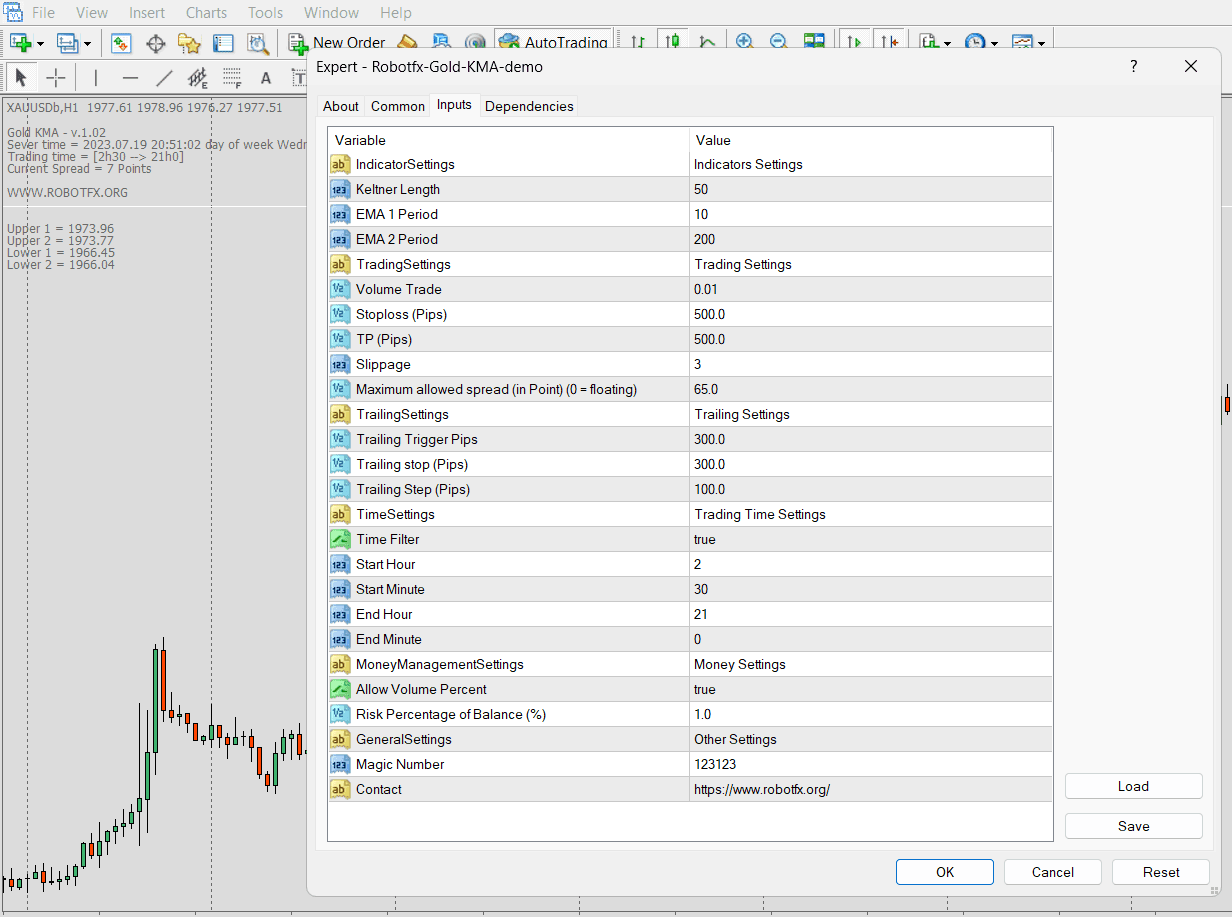
Key Features of the Gold KMA EA for MT4
The strategy uses a combination of trend-following indicators: the 10-period EMA acts as a short-term trend filter interacting with the Keltner Channel, while the 200-period EMA defines the broader market trend direction.
When price is above the 200 EMA, the EA prioritizes bullish setups. When price is below it, bearish conditions dominate. The interaction between price and the Keltner Channel helps confirm volatility-based entries.
The Gold KMA Expert Advisor MT4 is designed specifically for gold (XAUUSD) trading, where volatility expansion and strong directional impulses are common. It combines EMA-based trend filtering with Keltner Channel volatility structure to focus only on high-probability market conditions.
Unlike many grid or recovery systems, this approach aims to align entries with momentum rather than averaging against price, making it more suitable for trending phases in metals markets.
If you are also interested in similar automated strategies, you can explore other systems such as MetaTrader 4 Expert Advisors or MetaTrader 5 Expert Advisors.
Configuring Gold KMA EA Settings
The EA settings control volatility sensitivity, EMA filters, and Keltner channel behavior. Proper tuning is important for gold (XAUUSD) due to its high volatility.
How to Use Gold KMA EA in MT4
- Download the EA file using the link below.
- Open MetaTrader 4 → File → Open Data Folder.
- Place the EA into MQL4 → Experts.
- Restart MT4 or refresh the Navigator panel.
- Attach the EA to a gold (XAUUSD) chart.
- Enable AutoTrading and adjust risk settings.
FAQ – Gold KMA EA MT4
Q1: Is this EA only for gold trading?
It is optimized for XAUUSD but can be tested on other volatile instruments.
Q2: What indicators does it use?
It combines Keltner Channels with 10 and 200 EMA trend filters.
Q3: Is it suitable for beginners?
Yes, but it should first be tested on a demo account due to gold volatility.
Q4: Does it work in all market conditions?
It performs best in trending and moderately volatile conditions.
RobotFX Suggested Video
The video will explain how the RobotFX Auto Recovery works and the strategy behind the loss recovery. Feel free to watch the rest of the videos too.